FFFSake Setup with Joystick Gremlin
NOTE: R13 is no longer supported; R14 is recommended.
Budget about 15-45 minutes for this one-time setup.
Using FFFSake requires the following third party dependencies. First, download them all:
- vJoy virtual joystick driver. Please download the latest signed
driver from
Brunner Innovation’s fork on GitHub. Download both the setup executable as well as the
SDK.ziparchive. - Joystick Gremlin
- (Strongly Recommended) HidHide,
a kernel-mode filter driver to hide physical devices from games. You
will probably have a lot of trouble configuring your game to use vJoy,
or using
FFFSake, if you don’t hide the physical device redirected through vJoy from the game. HidHide is the best option, at the time of this writing.
Install and configure these:
- Install vJoy. You can skip the reboot, doing it after the next step.
- Install HidHide and reboot.
- Install Joystick Gremlin, or use the “portable” version.
- Joystick Gremlin ships with support for an older version of the vJoy DLL, not
the one we want to use. First, navigate to the directory where you have
installed/extracted Joystick Gremlin. Look for a file named
vJoyInterface.dll, rename it to something likevJoyInterface.old.dll. - From the vJoy SDK zip archive you downloaded earlier, extract
SDK/lib/x86/vJoyInterface.dllto the above path, taking the place of the original DLL that Gremlin shipped with. - Launch Joystick Gremlin and ensure it starts.
- Close Joystick Gremlin for the next step.
- Joystick Gremlin ships with support for an older version of the vJoy DLL, not
the one we want to use. First, navigate to the directory where you have
installed/extracted Joystick Gremlin. Look for a file named
- Launch the
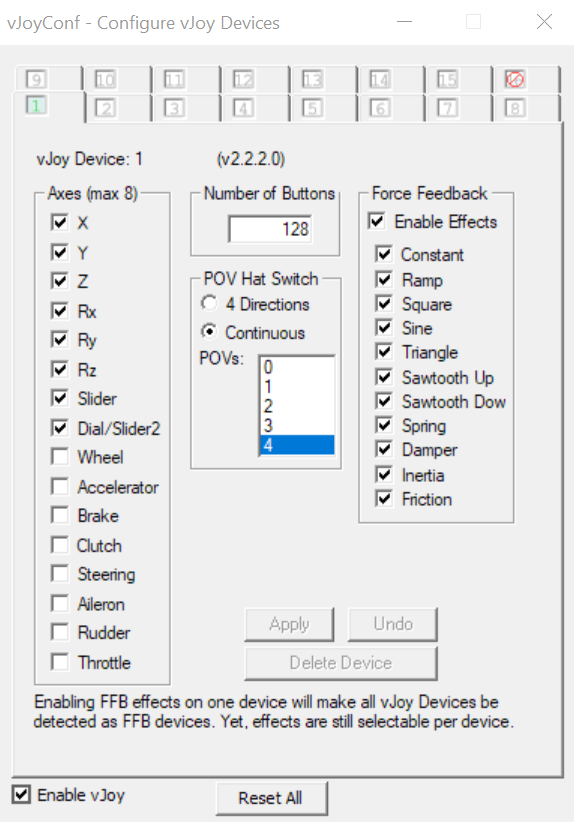
Configure vJoyapp from the Start Menu and configure vJoy. The recommendation on the Joystick Gremlin page is a bit outdated; instead, I suggest following this guide if you play mostly driving games. For everyone else, the recommended default is:
- Plug in your FFB device, then launch and
configure Joystick Gremlin:
- Suggestion for new users: verify that your plugged in physical device shows
up; switch to that tab. From the
Actionsmenu, create a 1:1 mapping. Scroll down the list and verify that a 1:1 mapping was created (usually works as long as you start with a clean slate i.e. zero existing mappings). Joystick Gremlin Quickstart has more details for this step. - Switch to the
Pluginstab. Use theAdd Pluginbutton and browse to thejoystick_gremlin/r13_plugins/fffsake_gremlin_plugin.pyfile, at the location you extracted Sim Gamer Kit to. - Once the plugin has been added, click on the cog wheel for the plugin to
open its configuration. From the
FF Devicedropdown in plugin configuration, ensure your FFB capable device is selected. Most people would have exactly one such device. - Select either the
forwarderor thereducerengine. See section below for details. If you’re not sure, start with thereducerengine if using a wheel andforwarderif using a joystick. - [REQUIRED] Bind a button for
Mute/Unmute Force Feedback. Think of this as a safety cutoff button, to be pressed if you lose control of your FFB device. For this reason, use a button not on the FFB joystick/wheel. It doesn’t need to be on the FFB device either. Once done, the plugin page should look something like the follows, minus theRunning and Activestatus (we’ll do that later):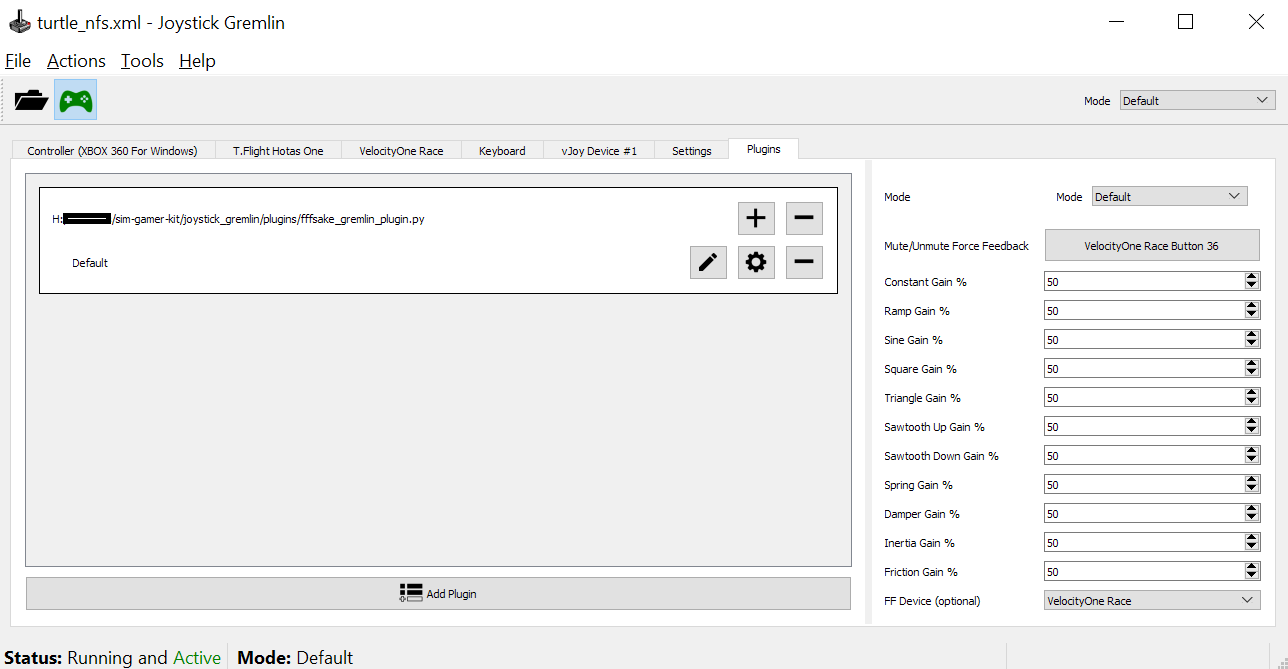
- Save the profile.
- Close Joystick Gremlin for the next step.
- Suggestion for new users: verify that your plugged in physical device shows
up; switch to that tab. From the
- Launch and
configure HidHide:
- Decide if you want to use list all the games you want to use with vJoy (allowlist, “Inverse cloak” unchecked), or list all the games and applications you won’t be using with vJoy (blocklist, “Inverse cloak” checked). I use the blocklist because that list is shorter for me.
- Add paths to all the applications that belong to the above list. For
games with launchers, you want the game binary path, not the launcher.
I typically launch the game, and then use Windows Task
Manager (launch via
Ctrl + Shift + Esc) to find the path of the application.exefile. The applications tab should look something like: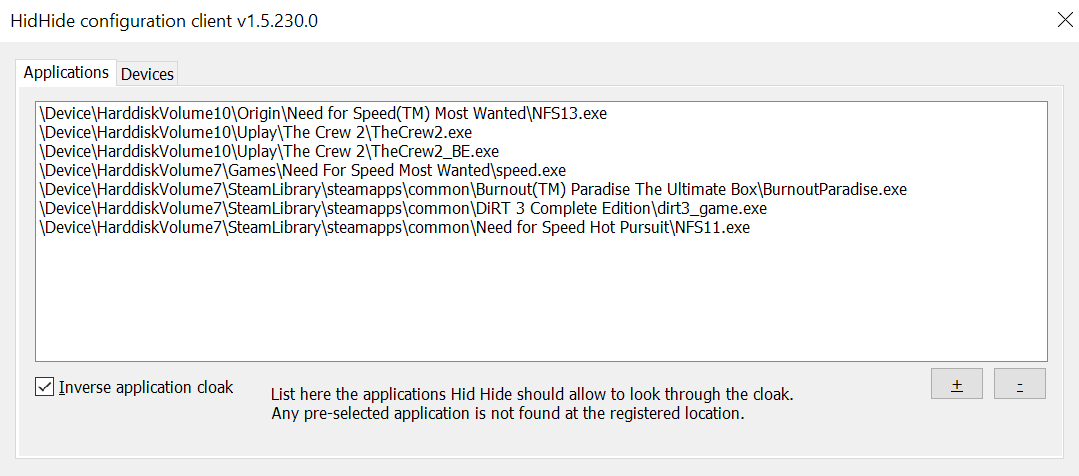
- If using an allowlist, make sure to add paths to Joystick Gremlin as well as the control panel/configuration application for your physical device.
- On the devices tab, select the physical device (needs to be plugged in to show up) that you want to use through Joystick Gremlin.
- Check “Enable filtering” and unplug-replug (or power off/on) the
device.
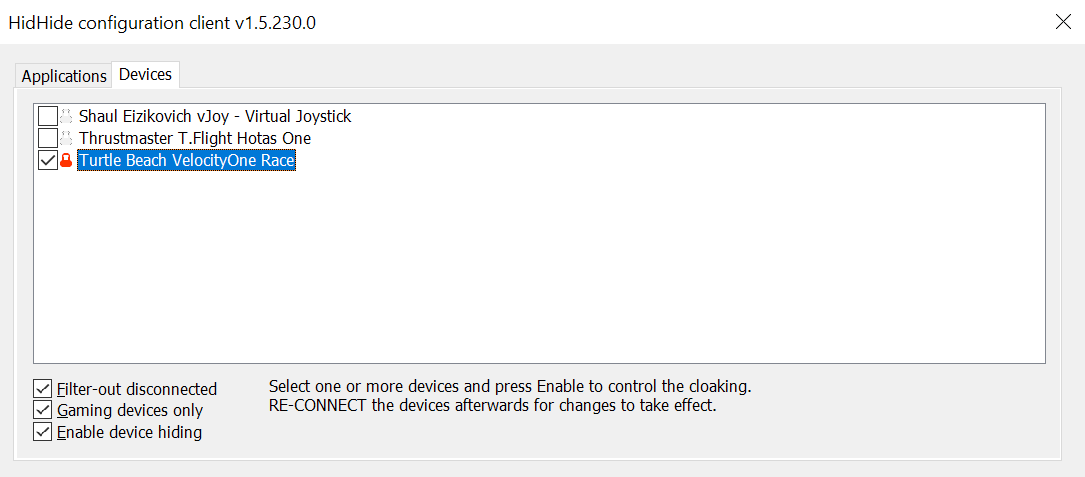
- Launch Joystick Gremlin, ensure that your physical device is still there. If not, double check that you added the Joystick Gremlin application path correctly (if you’re using the allowlist approach) in HidHide. Then click on “Enable” button.
This is a lot of setup; if you made it this far, congratulations! You’ve enabled some really powerful tools for your sim gaming journey. I suggest starting with a single Joystick Gremlin profile and then branching out to more as you gain experience with these tools.