vJoy Configuration
Note: The configurations below have only been verified with DirectInput8 games on Windows 10 and 11. Games using older versions of DirectInput haven't been tested.
For Driving Games
Note: This requires a patched version of
vJoyConf.exe. In the Sim Gamer Kit, you can find it atvjoy/bin/vJoyConf.exe.
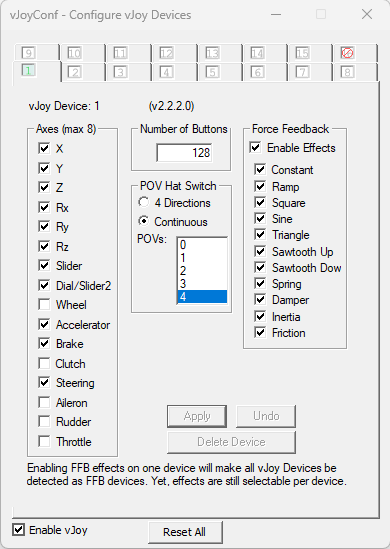
This configuration is recommended for driving games, as it allows vJoy to be detected as a wheel by DirectInput. It should also work fine with non-driving games.
All Other Games
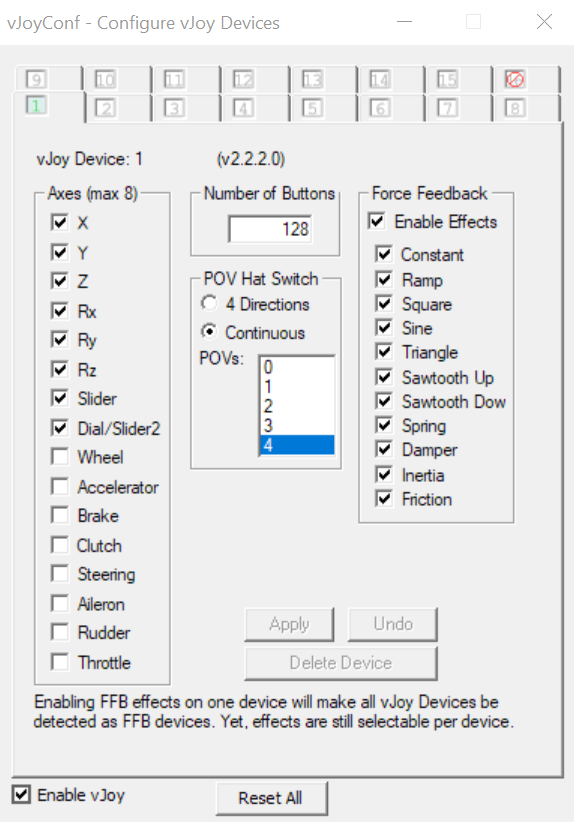
The above configuration might cause an issue with non-driving games, in which case, use the
following instead (the only difference is that Accelerator, Brake and Steering are not enabled):
Technical Details
If you're wondering why the first configuration has more than 8 axes: the 8 axes limit is not for HID devices, but rather is a DirectInput limitation. It was probably (once?) a limitation in (the default HID driver shipped with?) Windows as well.
Using that configuration creates a valid vJoy HID device, and DirectInput ignores the additional axes. There should generally be no issues in games, and it works with Joystick Gremlin R13 as well. You will map one of the first 8 axes in-game as accelerator, brake, clutch and steering.
Optimal "Driving" Configuration
This is the optimal configuration for driving games i.e. maximum axes enabled; steering, brake and accelerator get mapped to X, Y and Rz axes and you get the maximum 8 axes:
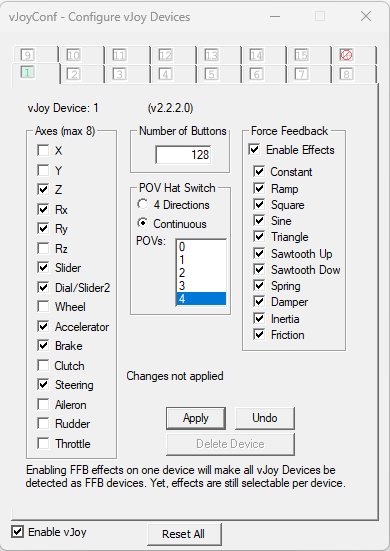
However this isn't currently supported by Joystick Gremlin.
What about "Clutch"?
I couldn't get the "clutch" to work with DirectInput, so it's excluded from all configurations above. You should still be able to map some other axis in-game as a clutch.